Thursday, June 9, 2011

Sample Replication Peer-To-Peer SQL Server 2008 .

What is Peer-To-Peer Replication ?

By the declaration of MSDN for Peer-To-Peer Replication 'Peer-to-peer replication provides a scale-out and high-availability solution by maintaining copies of data across multiple server instances, also referred to as nodes.'

The benefits of the P2P Replication

1- Read Increase : any inserted data for any nodes will be spread to other nodes.
2- Maintains availability : if any node will be down then the application layer can redirect to a complete data for any other active node.
3- Online/Offline data availability : any node can work out side the replication (for administarative tasks or maintenance requirement) and then return back to P2P replication to get all  lost data form other nodes.

The Topologies of P2P Replication

the following topology dislpay the interaction between clients and SQL Server databases in the IT comany infrastructure.


Another topologies.


our example assume working with two instance (SERVER08) and (SERVER08\INST2) . we need to have a replicate between two instances.

before anything run the following script, it's about creating database with table and insertions for this table. this database is our target of working with peer to peer (p2p) between two instances.

create database MySampleDB

go
use MySampleDB
go
create table Emp_Tbl
(
id int primary key ,
nam nvarchar(max)
)
go
insert into Emp_Tbl values(1,'ahmed')
insert into Emp_Tbl values(2,'mohamed')
insert into Emp_Tbl values(3,'emad')
insert into Emp_Tbl values(4,'tareq')

1- the first step to configure p2p for two instance, is check the instances services and agents in the SQL Server Configuration Manager


the highlight services in the last pic must to be run before working with p2p replication .

2- after that goto SQLServer database that is found in (SERVER08) and make full backup to c:\mybackup.bak.

3- restore this backup to another instance (SERVER08\INST2).

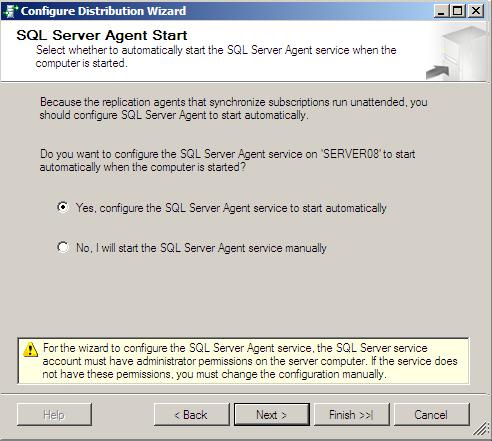
4- now we need to configure Distribution server for both instances. each inctance will have a separate Distribution server .

5- Configure Distribution server for (SERVER08)


6- Configure Distribution server for (SERVER08\INST2)
it's the same with previous step, but with (SERVER08\INST2) instance.

7- Return again to (SERVER08) .


form the local publication folder in the Replication folder . right click and select New Publication.

 select your database from the list


for working with P2P replication you must select transactional replication from the list of publication type


 select your objects that you want to replicate


if you need any filters about your data.


you can select from one or two option in Snapshot Agent , select the first option to create snapshot immediately . if you need to make scheduale you can select the second option also.


your agent need to set security, click on the Security Settings button


set administration account here by 'yourdomain\youraccount' template and set administrator password.


type your publication name.


8- after finish the publication creation, right click on it and then select properties


from subscription options tab, select Allow peer-to-peer subscriptions option and change value from Flase to  True. and then click OK.


9- Return to publication item (MyPublication) again in the first server (Server08),  then right click and select
Configure Peer-To-Perr Topology


this option will let chance to relate multi-nodes together to distribute data between them .


select your publication to configure there topology


this screen will lead to draw all your nodes that wanted to be added and links together. if you select any node you will see ToolTip contain infomarion about this node.

Remember that node mean SQLServer Device or instance that will be found in your Topology .


To add new node in your topology, right click on any empty area inside your topology and then select Add a New Peer Node .


Select the second instance you want to add (or second server) .

after that select your database that will act a replication in the second server (in our example you will select thr recovered database that you do that in previous steps)

if you need SQL Server to link your new node directly with the exist nodes in the topology , check on the option Connect to ALL displayed nodes. and take your new node a new rank by the Peer Originator ID

after that your topology will display your new node with other nodes. you can repeat this step again with new nodes .

all your new nodes will appear in the Log Reader Agent Security window. your need here to set security setting about agent to let replicate use log reader with a wright context security.


Here, set security agent for replicate data distribution. if you need to one context security for all nodes , check on below option.


In this step you need to tell thew wizard how can get data for new peers. if you have a backup, wizard can restore it for you [the second selection] . or you can do that manually (that is our situation) [the first selection]


your can check your affect of your P2P replication by view Replication folder for each instance. you can summarize that each node will act (Publication and Subscriber) for others.


10 - Now you test your replication between your inctances by inserting new records in both tables for each database instance .


In server 'Server08'
insert into dbo.Emp_Tbl values (5,'taha')

In server 'Server08\Inst2'
select * from MySampleDB.dbo.emp_tbl -- your will see new record added

In server 'Server08'

insert into dbo.Emp_Tbl values (5,'taha')

In server 'Server08\Inst2'
select * from MySampleDB.dbo.emp_tbl -- your will see new record added

Saturday, June 4, 2011

Working with CURSOR

it's old fasion but important in some cases

DECLARE @AuthorID char(11)

DECLARE c1 CURSOR READ_ONLY
FOR
SELECT au_id
FROM authors

OPEN c1
FETCH NEXT FROM c1 INTO @AuthorID

WHILE @@FETCH_STATUS = 0
BEGIN
 PRINT @AuthorID
 FETCH NEXT FROM c1
 INTO @AuthorID
END

CLOSE c1
DEALLOCATE c1

SQL Server 2008 (T-SQL) Creating FullText Index

this example work on adventureworks database.

for working with fulltext index, we need to create index on table . the following code create table with DocID . this column datatype is int with primary kry. note also the column DocContent with varbinary(max) and column DocSummary with nvarchar(max) . the last two column is our target of creating fulltext index.

CREATE TABLE _My_ProductDocs (
DocID INT NOT NULL IDENTITY,
DocTitle NVARCHAR(50) NOT NULL,
DocFilename NVARCHAR(400) NOT NULL,
FileExtension NVARCHAR(8) NOT NULL,
DocSummary NVARCHAR(MAX) NULL,
DocContent VARBINARY(MAX) NULL,
CONSTRAINT [PK_ProductDocs_DocID] PRIMARY KEY CLUSTERED (DocID ASC)
)
GO

--------------------------------------------------------------------------------

Now we need to filling data from Production.Document (adventureworks DB) to our created table.

INSERT INTO _My_ProductDocs
(DocTitle, DocFilename, FileExtension, DocSummary, DocContent)
SELECT Title, FileName, FileExtension, DocumentSummary, Document
FROM Production.Document
GO

--------------------------------------------------------------------------------

Showing data inserted in the our table

select * from _My_ProductDocs

--------------------------------------------------------------------------------

First step  now is creating FULLTEXT Catalog.

--Creating the Full-Text Catalog
USE AdventureWorks
GO
CREATE FULLTEXT CATALOG My_ProductFTS
WITH ACCENT_SENSITIVITY = OFF

--------------------------------------------------------------------------------

To know defalut database collation, you can select from system view sys.databases the column name collation_name will tell about the collation of the selected database.

SELECT name, collation_name FROM sys.databases
WHERE name = 'AdventureWorks'

--------------------------------------------------------------------------------

Verify that the catalog has been created

SELECT fulltext_catalog_id, name FROM sys.fulltext_catalogs

--------------------------------------------------------------------------------

define a full-text index . it's need in this step to specify your columns that you need to make your fulltext index. in the following code fulltext index will create on our table _My_ProductDocs and use the columns (DocSummary - DocContent) . because of the DocContent has varbinary(max) datatype you can specify TYPE COLUMN keyword, it's help SQL Server to determine the type file for each cell binary in the DocContent column . also you need to specify the type of your language you will use by your fulltext index it's make by keyword LANGUAGE with the number of your language.

at general, you can't create fulltext index without a primarykey in your table. the creation of your fulltext index will use the primarykey constraint of your table PK_ProductDocs_DocID . fulltext index need also to associate himself with the name of specific fulltext catalog  My_ProductFTS .

finally, you can attach s stoplist items for you fulltext index. stoplist item will help SQL Server to detect noisy words that you don't like to be included in your fulltext index.
the line of code WITH STOPLIST = SYSTEM mean that your fulltext index will be use the system STOPLIST the is found in SQL Server. you can make you owen list and configure that .

CREATE FULLTEXT INDEX ON _My_ProductDocs
(DocSummary, DocContent TYPE COLUMN FileExtension LANGUAGE 1033)
KEY INDEX PK_ProductDocs_DocID
ON My_ProductFTS
WITH STOPLIST = SYSTEM

--------------------------------------------------------------------------------

Create a stoplist

CREATE FULLTEXT STOPLIST ProductSL
FROM SYSTEM STOPLIST;


Verify that the stoplist has been created

SELECT stoplist_id, name FROM sys.fulltext_stoplists

---------------------------------------------------------------------------------

You can view stoplist contents

SELECT stopword FROM sys.fulltext_stopwords
WHERE stoplist_id = 5 AND language_id = 1033

---------------------------------------------------------------------------------

Add words to stoplist

ALTER FULLTEXT STOPLIST ProductSL
ADD 'nuts' LANGUAGE 1033;

---------------------------------------------------------------------------------

Test how SQL Server will tokenize a string based on a specific language and stoplist

SELECT special_term, display_term
FROM sys.dm_fts_parser
(' "testing for fruit and nuts, any type of nut" ', 1033, 5, 0)

---------------------------------------------------------------------------------

Drop “nuts” from the stoplist

ALTER FULLTEXT STOPLIST ProductSL
DROP 'nuts' LANGUAGE 1033;
-----------------------------------------------------------------------------------

Modify FULTEXT INDEX with new STOPLIST

ALTER FULLTEXT INDEX ON _My_ProductDocs
SET STOPLIST ProductSL

--------------------------------------------------------------------------------
Return a list of the document types supported by full-text search

SELECT document_type, version, manufacturer
FROM sys.fulltext_document_types

--------------------------------------------------------------------------------

View a list of the identifiers and their associated languages

SELECT * FROM sys.fulltext_languages
ORDER BY lcid

--------------------------------------------------------------------------------

Verify the index has been created and is associated with the correct catalog

SELECT t.name AS TableName, c.name AS FTCatalogName
FROM sys.tables t JOIN sys.fulltext_indexes i
ON t.object_id = i.object_id
JOIN sys.fulltext_catalogs c
ON i.fulltext_catalog_id = c.fulltext_catalog_id

---------------------------------------------------------------------------------

Lists the contents of the index

SELECT display_term, column_id, document_count
FROM sys.dm_fts_index_keywords
(DB_ID('AdventureWorks'), OBJECT_ID('_My_ProductDocs'))

---------------------------------------------------------------------------------

Modifying the Full-Text Thesaurus

EXEC sys.sp_fulltext_load_thesaurus_file 1033

encryption and decryption without keys or certificate

the following code will encrypt data and decrypt that with a simple two function EncryptByPassPhrase and DecryptByPassPhrase . the encryption with this function use Triple DES  encryption algorithm by default.

by two side of encry or decry, you specify your keyword (the formula that will use for encry and decry). if you encry data by keyword 'cairo city' for example, then you must decry you data by the same keyword. if you use another keyword you will fail to decry your data.

Note that every time you make a encry for fixed string with same keyword encry the result will difference.

DECLARE @org_text nvarchar(1000), @enc_text varbinary(2000);
SET @org_text = N'Type you data here';
SET @enc_text = EncryptByPassPhrase(N'your keyword', @org_text);
SELECT 'Original text = ', @org_text;
SELECT 'Encrypted text = ', @enc_text;
SELECT 'Decrypted plain text = ',
CAST(DecryptByPassPhrase(N'your keyword', @enc_text) AS nvarchar(1000));